Boda8 Account Feature
How Boda8 Instant Rebate Works
Boda8 Instant Rebate is presented inside the Fund area of the Boda8 account interface. This visual guide explains the route, the information shown on screen and the role of the Claim All control.
What is Boda8 Instant Rebate?
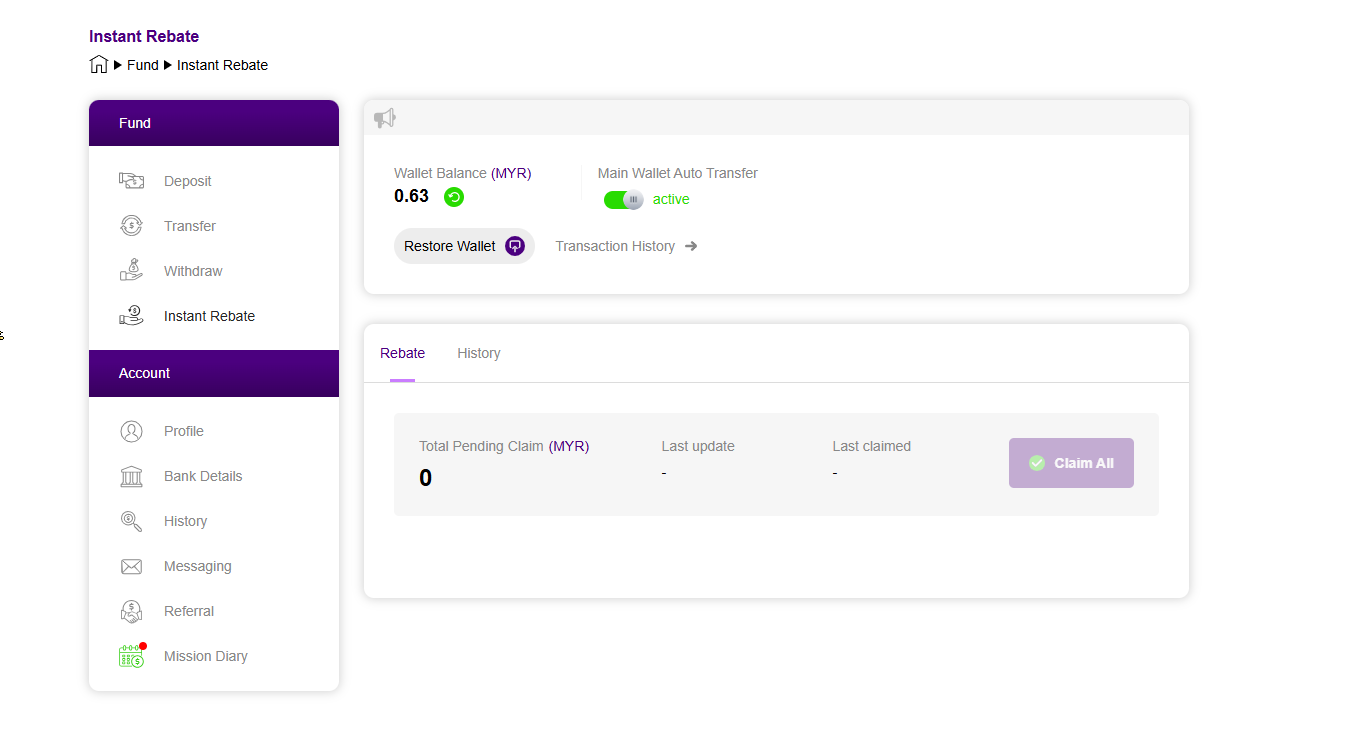
Boda8 Instant Rebate is an account feature shown under the Fund navigation. The supplied interface displays an Instant Rebate page with a Rebate tab, a History tab, Total Pending Claim information and a Claim All control. This makes the feature distinct from a promotional banner: it is presented as part of the signed-in account workflow.
The exact value available to an account is not determined by this guide. Visitors should use the live Boda8 account view for their own current information.
Boda8 account → Fund → Instant Rebate. The same Fund menu shown in the supplied screenshots also contains Deposit, Transfer and Withdraw.
Where to find Boda8 Instant Rebate
In the desktop screenshot, the Boda8 account navigation appears on the left. The Fund group lists Deposit, Transfer, Withdraw and Instant Rebate. Selecting Instant Rebate opens the main panel on the right. A smaller mobile crop shows the same sequence, confirming that Instant Rebate remains part of the Fund menu on a narrower screen.
- Enter the official Boda8 account experience.
- Open the Fund navigation.
- Select Instant Rebate.
- Review the account-specific information displayed in the Rebate panel.
What the Boda8 rebate screen shows
The account screenshot gives visitors a useful preview of the interface without requiring Boda8.net to imitate the live account system. The visible screen includes:
- Wallet Balance: the balance area shown at the top of the Fund screen.
- Main Wallet Auto Transfer: a visible status control beside the balance panel.
- Total Pending Claim: the rebate amount currently presented as pending.
- Last update and Last claimed: account history indicators in the rebate panel.
- Claim All: the visible action used inside the Instant Rebate interface.
- History: a separate tab for reviewing rebate activity.
Understanding the Claim All journey
The Claim All control sits next to the pending claim summary. Its placement makes the intended journey clear: review the displayed pending amount and then use the account control when it is available. Boda8.net only explains what is visible in the supplied interface; the official account page remains the source for live eligibility, values and status.
This separation is important for clarity. A promotional landing page can introduce Instant Rebate, but it should not display invented account balances or imply that every visitor has the same pending claim.
Official Boda8 Route
Continue to the Boda8 account journey
Registration and account-specific Instant Rebate information are handled on the linked Boda8 platform.
Visit Boda8 NowUsing the Boda8 Rebate History tab
The History tab is shown next to Rebate in the account panel. It gives the Instant Rebate area a clear two-part structure: one view for the current pending claim and another for past activity. For anyone researching the feature, this is the main practical difference between a one-time promotion card and an account tool with an ongoing record.
For the wider platform context, read What Is Boda8 Malaysia?. To compare Instant Rebate with other reward themes, continue to the Boda8 Promotions Guide. For the difference between calculation bases, caps, timing and wallet treatment, use the Boda8 rebate vs cashback comparison.
- Official Boda8 Instant Rebate route
- Supplied Boda8 desktop and mobile Instant Rebate interface screenshots
- Official Boda8 Promotions page